
AI Intelligence
Dogorithm leverages AI to streamline your workflow and help you prioritize the work that matters most.
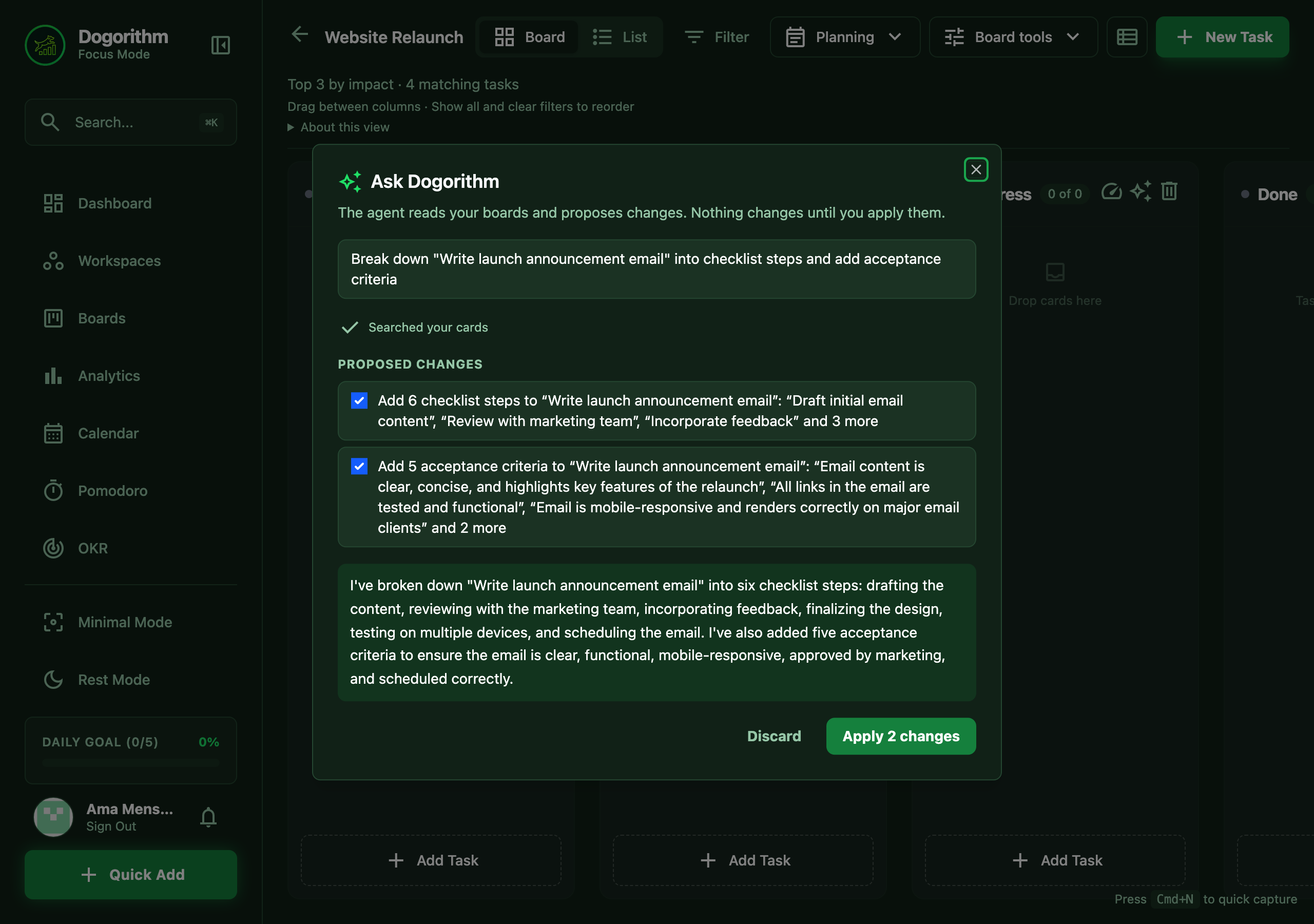
Ask Dogorithm (agents)
Ask for work in plain words and let an agent do the legwork:
- Press
Cmd/Ctrl + Kand type a request of three words or more, then press Enter on Ask Dogorithm: … (or choose Ask Dogorithm… and type in the box). On a board, the agent starts from that board. - The agent reads what it needs (your boards, a card, your day) and shows each step as it goes.
- It lists the changes it would make, in plain words: create a card, update a card's title, description, impact, due date or estimate, move a card, add checklist steps or acceptance criteria, comment, add a label, or add a teammate.
- Untick anything you don't want and choose Apply. Nothing on the board changes before that. Undo reverses everything that was applied.
Good things to ask:
- "Break down Write the launch email into steps and add acceptance criteria."
- "Draft release notes for version 2.0 as a comment on Release notes."
- "Create a card Book the venue in To Do, high impact, due next Friday."
- "What's overdue on this board?" (the agent answers and changes nothing).
Agents with a job:
- On a task (the ✨ button in task details): Break it down proposes checklist steps, acceptance criteria and an estimate; Draft it writes a first draft of what the task asks for (an email, a spec, an announcement) as a comment that starts with "Draft:"; Find what's blocking it looks at its prerequisites and comments, proposes next steps, and can draft a nudge to whoever owns the blocking task.
- Triage my inbox (on the morning brief, or in
Cmd/Ctrl + K): proposes an impact score for each inbox task, a due date when the title gives one, a fitting label, and a comment on likely duplicates. - Prepare my standup update (
Cmd/Ctrl + K): writes your Done / Doing / Blockers from your boards, ready to say or paste. - Weekly review of this board (
Cmd/Ctrl + Kon a board): what finished, what's in progress, what's overdue or due soon, and the three most important next tasks, with due-date changes for overdue work only where they clearly help.
How it stays safe:
- The agent works as you: it can only read and change what you can, and it never deletes anything.
- Text inside cards and comments is treated as information, never as instructions, so a card can't tell the agent what to do.
- Moving a task into In Progress or Focus keeps the readiness check. Approving the move counts as your check when every prerequisite is done; if one isn't, the move is refused and you make it on the board.
- Every run is listed in Settings → Agents, with what was applied and an Undo button.
Each run counts as one AI action (25 a month on Free, unlimited on Pro, up to 100 runs a day). Agents appear once your deployment names an agent model.
AI Chief of Staff (Dashboard)
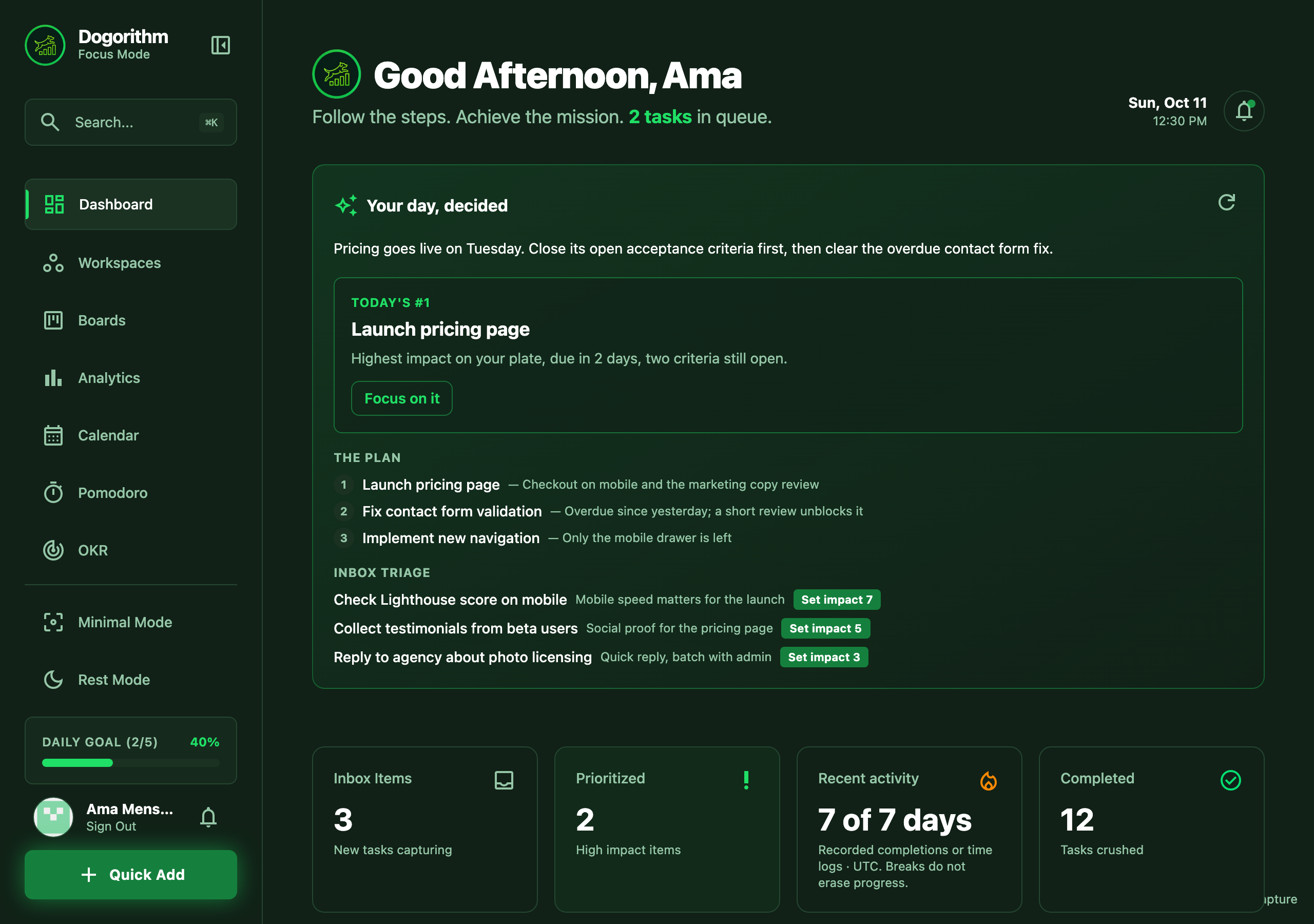
Your dashboard opens and closes the day for you:
- Morning Brief: a top pick for the day, a short plan, and an inbox triage — with one-tap impact scores and duplicate-card flags. Press Focus on it to review the top pick's pre-flight check and start a focus session.
- Evening Shutdown: your wins, anything stuck, and a seed for tomorrow, so you can close the laptop with a clear head.
The brief works best with an AI provider configured; without one it falls back to a deterministic summary of your boards.
AI Task Breakdown
Vague tasks can be hard to start. Click the "AI Breakdown" button on any card to generate a list of actionable micro-actions automatically.
- Benefit: Reduces the cognitive load of planning and gets you to "done" faster.
Smart Impact Suggestions
Uneasy about how to rank a task? The AI analyzes your task title and description to suggest an Impact Score (1-10).
- Benefit: Ensures your prioritization is based on objective value rather than just urgency.
Natural Language Entry
Use the Quick Capture (Cmd+N) to type tasks in plain English (e.g., "Draft project proposal by Friday at 5pm"). The AI will parse the due date and details for you.